
Dieser Artikel stammt aus dem Jahr 2017. Versionen, Werkzeuge und Empfehlungen können sich seitdem geändert haben. Neuere Beiträge findest du unter DevOps.
Git Flow
Der Git Flow - früher ein Plugin, heute Bestandteil von Git - ist ein bewährter Workflow, wie mit Hilfe von Branches zusammen im Team an einer Software gearbeitet wird. Dies wird auch bei der Initialisierung eines git-Repositories abgefragt:
1# Initialisierung eines git Repositories
2git init
3
4# Initialisierung von git flow:
5git flow init
Anschließend wird man nach den entsprechenden Branches gefragt:
1Branch name for production releases: [master]
2Branch name for "next release" development: [develop]
3How to name your supporting branch prefixes?
4Feature branches? [feature/]
5Release branches? [release/]
6Hotfix branches? [hotfix/]
Die Konkurrenz von Visual Studio Team Services
Bei Open Source Projekten ist der Git-Flow der Quasi-Standard. Kein Repository lässt zu, dass unbeteiligte direkt auf das Quell-Repository/den jeweiligen Branch committen dürfen. Der übliche Weg ist über einen Pull Request.
Plattformen wie GitHub, BitBucket und Co unterstützen den Git Flow von Haus aus. Ein Kopfdruck und Git-Flow ist eingerichtet.
Visual Studio Team Services
Bei VSTS ist dem leider nicht so.
Technisch gesehen ist der Git Flow ein Schutz, dass nicht - ohne entsprechende Berechtigung - auf einen Branch committen werden darf.
Genau dies muss in VSTS von Hand eingerichtet werden. Dazu gibt es in der Branch-Verwaltung des Repositories die Funktion der Branch Policies.
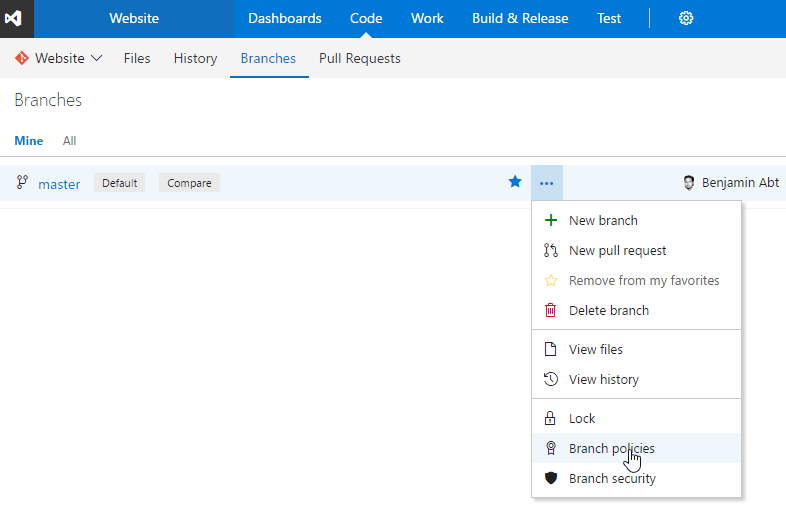
Anschließend muss folgendes aktiviert werden:
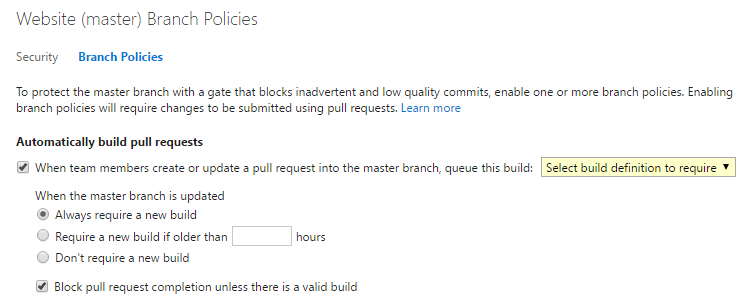
Jetzt kann nicht mehr direkt auf den - in meinem Beispiel - master-Branch committed werden, sondern nur nich mit Hilfe eines Pull-Requests zB. aus einem feature-Branch heraus.
Ebenso muss eine Build-Definition erfolgreich sein, bevor ein anschließender Merge von feature auf master möglich ist.
Related articles

- 2 min read
Top 5 Git Commit Message Best Practises in 2024
When you join a project as a new developer, you see one thing above all: no standards for Git commit messages. Some put emojis in the …
- 2 min read
Setup VSTS YAML builds for your ASP.NET Core app
Idea YAML builds are a very common way to define builds in AppVeyor, but in Visual Studio Team Services (VSTS) this feature is pretty new - …
- 2 min read
Setup VSTS YAML builds for your Angular app
Idea According to the ASP.NET Core YAML build sample, this sample covers the Angular part. I recommend an own build agent, because the …

BEN ABT
Ben is Chief Engineering Officer and Principal Software Engineer at Medialesson.de, with a strong focus on .NET and Microsoft Azure. In his professional role, he designs and builds highly scalable platforms for hybrid and cloud-based scenarios. He also advises companies and C-levels on migrating to the sovereign cloud.
He runs myCSharp.de, the largest and most active German-speaking C# community forum, actively contributes to both his own and external open-source projects and regularly shares his knowledge through his blog, at community events, conferences and as a writer for technical magazines.
Let's Work Together
Looking for an experienced Platform Architect or Engineer for your next project? Whether it's cloud migration, platform modernization or building new solutions from scratch - I'm here to help you succeed.