
Dieser Artikel stammt aus dem Jahr 2018. Versionen, Werkzeuge und Empfehlungen können sich seitdem geändert haben. Neuere Beiträge findest du unter Blog.
Ziel ist es einen Raspberry PI mit dem Unitymedia WifiSpot zu verbinden.
Dafür verwende ich als Basis Ubuntu Mate 16.04, sowie einen Raspberry PI 3 {target=_blank}, der bereits einen W-Lan-Chip Onboard hat. Diese Anleitung funktioniert genauso mit einem Raspberry PI 2 {target=_blank} benötigt jedoch einen extra W-Lan-USB-Dongle. Ich verwende dafür ein EDUP-Dongle {target=_blank}.
Unitymedia WifiSpot Zertifikat
Das W-Lan von Unitymedia ist nicht mit einem normalen Heim-W-Lan zu vergleichen. Es wird eine besondere Authentifizierung verwendet, die ansonsten nur in größeren Unternehmen bzw. Konzernen zum Einsatz kommt.
Hierfür ist ein Zertifikat notwendig, das Unitymedia auf ihrer Website zur Verfügung stellt und manuell in Ubuntu konfiguriert werden muss:
https://www.unitymedia.de/content/dam/dcomm-unitymedia-de/Privatkunden/angebote/wifispot/LGI_Root_CA.cer {target=_blank rel=noopener}
Dieses Zertifikat solltet ihr herunterladen; denn es muss vor dem Einrichten des W-Lans auf dem Raspberry auf diesen kopiert werden. Natürlich könnt ihr das Zertifikat auch direkt vom Raspberry aus herunterladen um euch so den Kopiervorgang zu sparen.
Zertifikat auf den Raspberry kopieren
Um die Datei auf den Raspberry zu kopieren, müsst ihr erstmal ein Zielordner anlegen.
Ich habe dafür den Ordner /data angelegt; ein Bezeichner, den ich immer für verschiedene Dateien auf einem System verwende.
sudo mkdir /dataAnschließend müssen nun noch die Berechtigungen gesetzt werden, damit eine Datei zB. mit Hilfe von FileZilla und SFTP übertragene werden kann:
sudo chmod -R 777 /dataNun kann die Datei übertragen werden, zB. mit Hilfe von Filezilla oder WinSCP, jeweils über SFTP. Oder ihr ladet die Datei direkt mit Hilfe von Firefox, Chrome oder wget vom Ubuntu herunter.
wget https://www.unitymedia.de/content/dam/dcomm-unitymedia-de/Privatkunden/angebote/wifispot/LGI_Root_CA.cer -P /data/LGI_Root_CA.cerMit dem Befehl
sudo chmod -R 755 /datakönnt ihr nun die Rechte wieder auf den Ursprung zurück setzen.
WifiSpot einrichten
Sofern das Zertifikat sich nun auf dem Raspberry befindet und der Hardware Dongle (optional) im Raspberry steckt, kann das WiFi nun eingerichtet werden.
Dafür einfach den Network Manager (oben rechts) anklicken und Unitymedia WifiSpot anklicken.
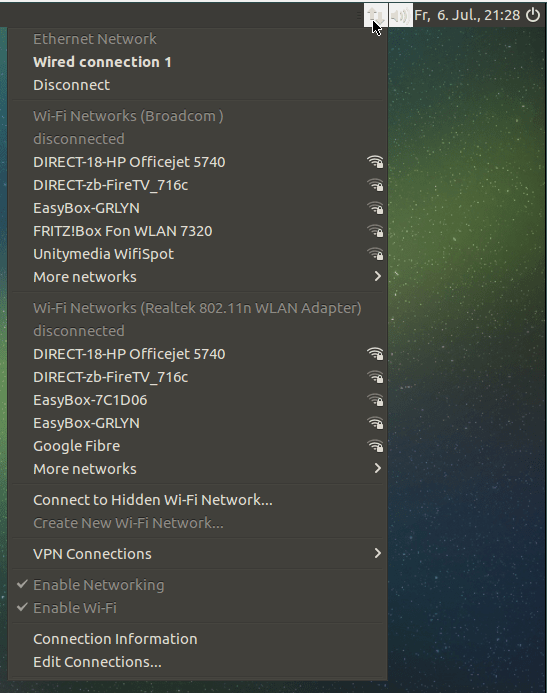
Nach dem Klick öffnet sich ein Fenster für die Eingabe der W-Lan Informationen. Neben dem Zertifikat gehört dazu der Unitmedia Benutzername (eine E-Mail Adresse) sowie euer Passwort.
Einstellungen:
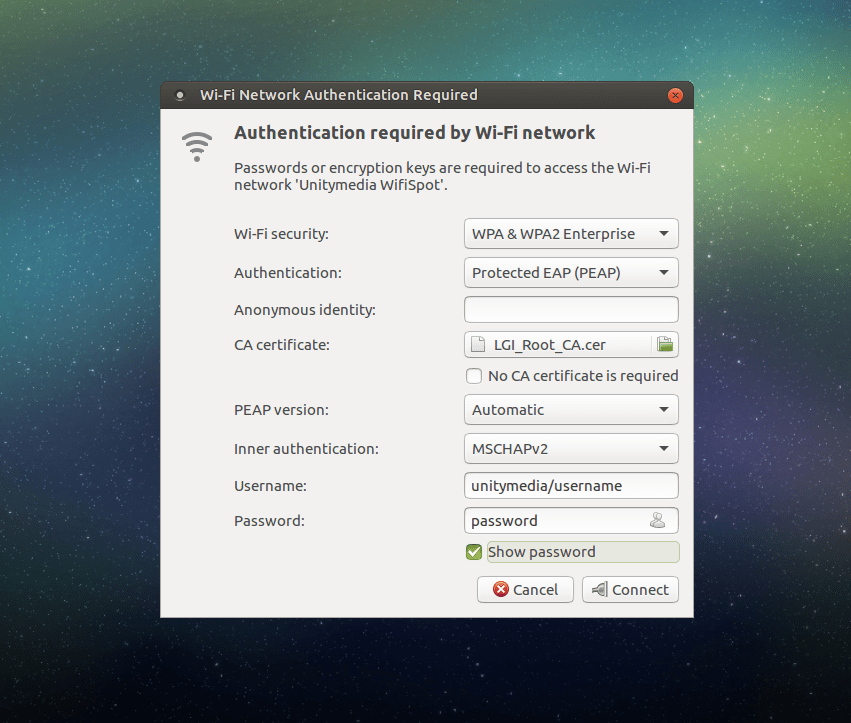
| Setting | Wert |
|---|---|
| WiFi security | WPA & WPA2 Enterprise |
| Authentication | Protected EAP (PEAP) |
| Anonymous identity | (leer lassen) |
| CA certificate | euer Zertifikat mit Hilfe der Dateiselektion auswählen |
| No CA certificate is required | Haken NICHT setzen! |
| PEAP version | automatic |
| Inner authentication | MSCHAPv2 |
| Username | Der Benutzername im Format unitymedia/<benutzername>,zB unitymedia/[email protected] |
| Password | euer Passwort |
Anschließend können die Einstellungen gespeichert werden und euer System verbindet sich.
Wenn nicht, dann einfach das W-Lan Unitymedia WifiSpot in der W-Lan Liste auswählen.
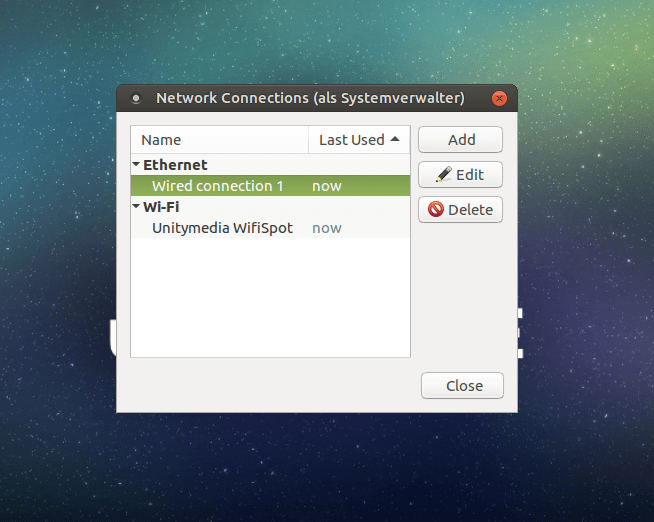
Der Network Manager zeigt zudem den Status der aktuellen Verbindung an:
Viel Erfolg und viel Spaß.
Related articles

- 2 min read
Fix Firefox crash on Ubuntu Mate
Unfortunately, currently the latest versions if Firefox (current: 61) on Ubuntu Mate are not supported. Firefox crashes. The latest version …

- 1 min read
Delete network manager entries in Ubuntu Mate
Often, I have the problem that the buttons of the Ubuntu Mate Network Manager to edit or delete network entries are disabled. This means the …
- 3 min read
Raspberry Pi OS: Set a Static IP Address
A static IP address ensures your Raspberry Pi is always reachable at the same network address instead of receiving a new one from the router …

BEN ABT
Ben is Chief Engineering Officer and Principal Software Engineer at Medialesson.de, with a strong focus on .NET and Microsoft Azure. In his professional role, he designs and builds highly scalable platforms for hybrid and cloud-based scenarios. He also advises companies and C-levels on migrating to the sovereign cloud.
He runs myCSharp.de, the largest and most active German-speaking C# community forum, actively contributes to both his own and external open-source projects and regularly shares his knowledge through his blog, at community events, conferences and as a writer for technical magazines.
Let's Work Together
Looking for an experienced Platform Architect or Engineer for your next project? Whether it's cloud migration, platform modernization or building new solutions from scratch - I'm here to help you succeed.