
This article was written in 2019. Versions, tools and recommendations may have changed since then. Newer posts are collected under Blog.
At the moment it happens to me more often that CodeLens is not active in Visual Studio. Unfortunately I couldn’t find out if this is in bug in the current preview version or if a Visual Studio extension is responsible for it.
You can activate the CodeLens easily via the Visual Studio options.
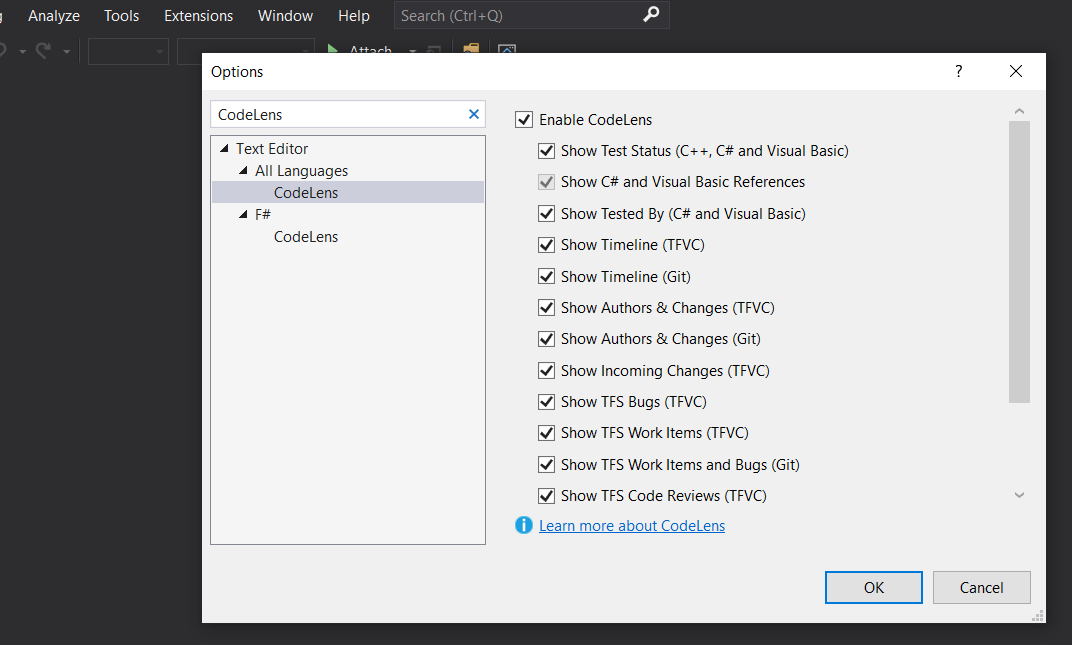
Simply open the modal option window under Tools -> Options, search for CodeLens and activate the desired features accordingly.
What’s CodeLens?
CodeLens is one of my favorite features in Visual Studio.
Above every important line of code like methods, classes or properties, Visual Studio inserts a line with helpful links:
- Latest Tests
- References used
- Last author
You can read more about CodeLens here: https://learn.microsoft.com/en-us/visualstudio/ide/find-code-changes-and-other-history-with-codelens
Related articles

- 5 min read
ASP.NET Core Serverless on AWS Lambda
Serverless Serverless is on everyone’s lips; in the .NET area it means mainly Azure Functions. In principle Serverless is all about …

- 4 min read
AWS Toolkit for Visual Studio 2019
AWS (Amazon Web Services) offers an extra toolkit for Visual Studio 2017 and Visual Studio 2019 that integrates seamlessly to create …

- 1 min read
HTTP Status 500 on debugging ASP.NET Core with Visual Studio 2017
I gave my PC a new Windows installation and run into the following error: Unable to start process C:\Program Files\dotnet\dotnet.exe. The …

BEN ABT
Ben is Chief Engineering Officer and Principal Software Engineer at Medialesson.de, with a strong focus on .NET and Microsoft Azure. In his professional role, he designs and builds highly scalable platforms for hybrid and cloud-based scenarios. He also advises companies and C-levels on migrating to the sovereign cloud.
He runs myCSharp.de, the largest and most active German-speaking C# community forum, actively contributes to both his own and external open-source projects and regularly shares his knowledge through his blog, at community events, conferences and as a writer for technical magazines.
Let's Work Together
Looking for an experienced Platform Architect or Engineer for your next project? Whether it's cloud migration, platform modernization or building new solutions from scratch - I'm here to help you succeed.