
Unfortunately I had the case that 99.9% of my CPU was occupied by “Windows Compatibility Telemetry” - and I didn’t know why.
Apparently this is a service that monitors the compatibility of applications and Windows. This service does not run permanently, but when certain events occur.
Now I must have run into one of the events and the service thought to use the whole CPU reserves. ¯_(ツ)_/¯
Disable Windows Compatibility Telemetry
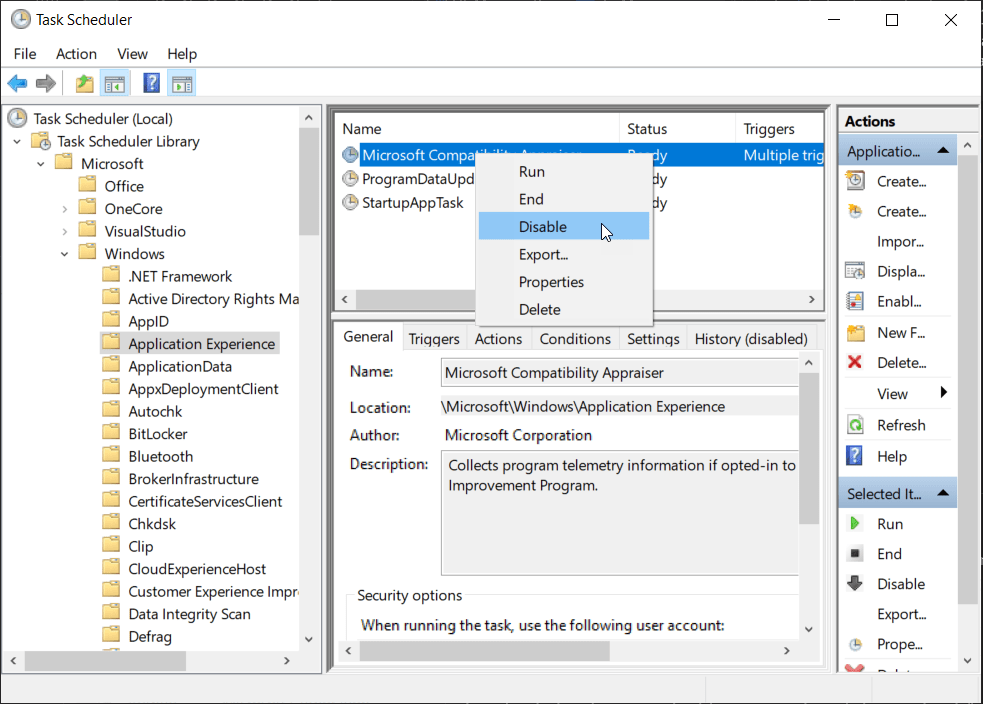
The telemetry is started via various triggers in the Windows Task Scheduler. At this point you can completely disable the service or the associated triggers.
- Open your Windows Start Menu
- Enter
Task Scheduler - Search for
Microsoft Compatibility Appraiseror open manually the PathTask Scheduler Library\Microsoft\Windows\Application Experience, selectApplication Experience - Use right-click and
disable
Related articles
Feb 16, 2016 · 1 min read
Pfad des aktuellen Desktop Hintergrundbilds in Windows 10
Genauso wie ich das Bild “verloren”, das man als Bildschirmhintergrund des Desktops gesetzt hat? Windows 10 speichert dieses …
Author

BEN ABT
Ben is a Principal Software Engineer at Medialesson.de, with a strong focus on .NET and Microsoft Azure. In his professional role, he designs and builds highly scalable platforms for hybrid and cloud-based scenarios. He also advises companies and C-levels on migrating to the sovereign cloud.
He runs myCSharp.de, the largest and most active German-speaking C# community forum, actively contributes to both his own and external open-source projects and regularly shares his knowledge through his blog, at community events, conferences and as a writer for technical magazines.
Let's Work Together
Looking for an experienced Platform Architect or Engineer for your next project? Whether it's cloud migration, platform modernization or building new solutions from scratch - I'm here to help you succeed.
Comments