Azure IoT Edge as a product is in principle not just a simple application or a simple container, but is actually more of a runtime for an ecosystem on a device.
For this reason there is not just an Azure IoT Edge Container, but a special container that also offers development runtimes.
At present - February 2020 - these are the following:
- Docker
- .NET Core SDK
- Python
- Pip
- Azure CLI
- Azure CLI IoT extension
- Cookiecutter
- Node.js
- Yeoman
- Azure IoT Edge Node.js module template
- OpenJDK
- Maven
- Git
To simplify the development you can simply use Docker for Desktop with the Azure IoT Edge development container. The development container contains all other components of the regular IoT Edge, including the IoT Edge Agent for executing your own modules, the IoT Edge Runtime itself and the IoT Edge Demon for starting the entire runtime.
If necessary, you could also create your own images based on this image, but these should only be used for development.
Download Azure IoT Edge Development Image
The Azure IoT Edge development container is publicly available on the Docker Hub and can be downloaded with a simple pull command.
However, please note the current size of almost 4 gigabytes!
1C:\Users\Ben> docker images
2REPOSITORY                             TAG                 IMAGE ID            CREATED             SIZE
3microsoft/iotedgedev                   latest              54eb77dd8859        4 weeks ago         3.84GB
Hint right now there are two different repositories: mcr.microsoft.com/iotedge/iotedgedev and microsoft/iotedgedev. The images are basically identical (including the Image Id), but the recommended repository is microsoft/iotedgedev.
Create Azure IoT Edge Development Container
In principle, the image can be easily downloaded via docker pull or directly when creating the container, if it is not already available locally.
In any case, it is recommended to create the container with a name, so that later handling with starting and stopping is easier.
The first thing to do is to create an extra folder on the local machine. This folder is assigned to the container via Docker Volume Mapping. This folder will later contain the Azure IoT Edge Solution Files, among others.
1mkdir C:\temp\iotedge
Now the container can be created together with a name. If the image was already downloaded, this is a matter of less than a second. Otherwise it takes a moment until the 4 gigabytes for the image are downloaded.
docker run –name myiotedgedev -it -v /var/run/docker.sock:/var/run/docker.sock -v C:\temp\iotedge:/home/iotedge microsoft/iotedgedev
1C:\Users\Ben> docker run --name myiotedgedev -it -v /var/run/docker.sock:/var/run/docker.sock -v C:\temp\iotedge:/home/iotedge microsoft/iotedgedev iotedgedev@db4d4539da5a:/home/iotedge$
Your container is now started and you have entered the interactive mode of your container. To leave the interactive mode, just use CTRL+D or enter exit. If you leave the interactive mode, your container will shotdown.
To leave the interactive mode without shuting down the container, use CTRL+P and CTRL+Q.
Init
The container is now still unconfigured. However, the container provides a wizard that takes care of the complete initialization of the Azure IoT Edge environment for development.
This requires an Azure Subscription, which must be placed in the container. The wizard then guides you through the creation of the Resource Group, IoT Hub and finally the registration as IoT Edge Device.
The initialization process places various files in the previously created folder. To start the initialization you have to enter the following: iotedgedev init
 1iotedgedev@db4d4539da5a:/home/iotedge$ iotedgedev init
 2
 3Welcome to iotedgedev!
 4---------------------
 5Learn more about .NET Core: https://aka.ms/dotnet-docs
 6Use 'dotnet --help' to see available commands or visit: https://aka.ms/dotnet-cli-docs
 7
 8Telemetry
 9---------
10The .NET Core tools collect usage data in order to help us improve your experience. The data is anonymous and doesn't include command-line arguments. The data is collected by Microsoft and shared with the community. You can opt-out of telemetry by setting the DOTNET_CLI_TELEMETRY_OPTOUT environment variable to '1' or 'true' using your favorite shell.
11
12Read more about .NET Core CLI Tools telemetry: https://aka.ms/dotnet-cli-telemetry
13
14ASP.NET Core
15------------
16Successfully installed the ASP.NET Core HTTPS Development Certificate.
17To trust the certificate run 'dotnet dev-certs https --trust' (Windows and macOS only). For establishing trust on other platforms refer to the platform specific documentation.
18For more information on configuring HTTPS see https://go.microsoft.com/fwlink/?linkid=848054.
19Getting ready...
20  Restore completed in 1.56 sec for /home/iotedgedev/.templateengine/dotnetcli/v2.1.803/scratch/restore.csproj.
21
22Usage: new [options]
23
24Options:
25  -h, --help          Displays help for this command.
26  -l, --list          Lists templates containing the specified name. If no name is specified, lists all templates.
27  -n, --name          The name for the output being created. If no name is specified, the name of the current directory is used.
28  -o, --output        Location to place the generated output.
29  -i, --install       Installs a source or a template pack.
30  -u, --uninstall     Uninstalls a source or a template pack.
31  --nuget-source      Specifies a NuGet source to use during install.
32  --type              Filters templates based on available types. Predefined values are "project", "item" or "other".
33  --force             Forces content to be generated even if it would change existing files.
34  -lang, --language   Filters templates based on language and specifies the language of the template to create.
35
36Templates                                         Short Name           Language          Tags
37------------------------------------------------------------------------------------------------------------------------------
38Console Application                               console              [C#], F#, VB      Common/Console
39Class library                                     classlib             [C#], F#, VB      Common/Library
40Azure IoT Edge Module                             aziotedgemodule      [C#], F#          Console
41Unit Test Project                                 mstest               [C#], F#, VB      Test/MSTest
42NUnit 3 Test Project                              nunit                [C#], F#, VB      Test/NUnit
43NUnit 3 Test Item                                 nunit-test           [C#], F#, VB      Test/NUnit
44xUnit Test Project                                xunit                [C#], F#, VB      Test/xUnit
45Razor Page                                        page                 [C#]              Web/ASP.NET
46MVC ViewImports                                   viewimports          [C#]              Web/ASP.NET
47MVC ViewStart                                     viewstart            [C#]              Web/ASP.NET
48ASP.NET Core Empty                                web                  [C#], F#          Web/Empty
49ASP.NET Core Web App (Model-View-Controller)      mvc                  [C#], F#          Web/MVC
50ASP.NET Core Web App                              razor                [C#]              Web/MVC/Razor Pages
51ASP.NET Core with Angular                         angular              [C#]              Web/MVC/SPA
52ASP.NET Core with React.js                        react                [C#]              Web/MVC/SPA
53ASP.NET Core with React.js and Redux              reactredux           [C#]              Web/MVC/SPA
54Razor Class Library                               razorclasslib        [C#]              Web/Razor/Library/Razor Class Library
55ASP.NET Core Web API                              webapi               [C#], F#          Web/WebAPI
56global.json file                                  globaljson                             Config
57NuGet Config                                      nugetconfig                            Config
58Web Config                                        webconfig                              Config
59Solution File                                     sln                                    Solution
60
61Examples:
62    dotnet new mvc --auth Individual
63    dotnet new webapi
64    dotnet new --help
65
66=========================================================================================================
67======== DOTNET NEW AZIOTEDGEMODULE -N FILTERMODULE -R ${CONTAINER_REGISTRY_SERVER}/FILTERMODULE ========
68=========================================================================================================
69
70The template "Azure IoT Edge Module" was created successfully.
71
72Processing post-creation actions...
73Running 'dotnet restore' on filtermodule...
74  Restore completed in 3.65 sec for /home/iotedge/modules/filtermodule/filtermodule.csproj.
75
76Restore succeeded.
77ADD COMPLETE
78
79AZURE IOT EDGE SOLUTION CREATED
80
81=========================================================
82======== IOTEDGEDEV IOTHUB SETUP --UPDATE-DOTENV ========
83=========================================================
84
85================================
86======== AUTHENTICATION ========
87================================
88
89Retrieving Azure CLI credentials from cache...
90
91Azure CLI credentials not found. Please follow instructions below to login to the Azure CLI.
92To sign in, use a web browser to open the page https://microsoft.com/devicelogin and enter the code <your personal code> to authenticate.
If you enter your credential like mentioned in the last line, you map your container to your azure subscription:
 1==============================
 2======== SUBSCRIPTION ========
 3==============================
 4
 5Retrieving Azure Subscriptions...
 6
 7Subscription Name            Id
 8--------------------------- ------------------------------------
 9Microsoft Azure Sponsorship  XXXXXXXXXXXXXXXXXXXXXXXXXXXXXXXXXXXX
10Personal Subscription Abt    XXXXXXXXXXXXXXXXXXXXXXXXXXXXXXXXXXXX
11
12Select an Azure Subscription Name or Id: [XXXXXXXXXXXXXXXXXXXXXXXXXXXXXXXXXXXX]: XXXXXXXXXXXXXXXXXXXXXXXXXXXXXXXXXXXX
13
14======================================
15======== SETTING SUBSCRIPTION ========
16======================================
17
18Setting Subscription to 'XXXXXXXXXXXXXXXXXXXXXXXXXXXXXXXXXXXX'...
If you have mapped your subscription to your IoT Edge development container, the init tries to connect to an IoT Hub on Azure.
If you dont have an IoT Hub instance there, the wizard creates one for you. In my case, I already have an existing resource group for my Azure IoT demos, but the wizard will create a new IoT Hub for me.
 1=========================================
 2======== RESOURCE GROUP LOCATION ========
 3=========================================
 4
 5Enter a Resource Group Location: (australiaeast, australiasoutheast, brazilsouth, canadacentral, canadaeast, centralindia, centralus, eastasia, eastus, eastus2, japanwest, japaneast, northeurope, northcentralus, southindia, uksouth, ukwest, westus, westeurope, southcentralus, westcentralus, westus2) [westus]: westeurope
 6
 7=================================================
 8======== SETTING RESOURCE GROUP LOCATION ========
 9=================================================
10
11Setting Resource Group Location to 'westeurope'...
12
13================================
14======== RESOURCE GROUP ========
15================================
16
17Retrieving Resource Groups...
18
19Resource Group           Location
20----------------------- ----------
21ABT-IOT-DEMOS-RG         westeurope
22
23Enter Resource Group Name (Creates a new Resource Group if not found): [iotedgedev-rg]: ABT-IOT-DEMOS-RG
24
25=============================================
26======== SETTING RESOURCE GROUP NAME ========
27=============================================
28
29Setting Resource Group Name to 'ABT-IOT-DEMOS-RG'...
30
31Checking if Resource Group 'ABT-IOT-DEMOS-RG' exists...
32
33Retrieving Resource Group 'ABT-IOT-DEMOS-RG' location...
34
35============================
36======== IOTHUB SKU ========
37============================
38
39Enter IoT Hub SKU (F1|S1|S2|S3): (F1, S1, S2, S3) [F1]: S1
40
41=====================================
42======== SETTING IOT HUB SKU ========
43=====================================
44
45Setting IoT Hub SKU to 'S1'...
46
47=========================
48======== IOT HUB ========
49=========================
50
51Retrieving IoT Hubs in 'ABT-IOT-DEMOS-RG'...
52
53Enter the IoT Hub Name (Creates a new IoT Hub if not found): [iotedgedev-iothub-113b2c]: abt-iothub-demo
54
55=================================
56======== SETTING IOT HUB ========
57=================================
58
59Setting IoT Hub to 'abt-iothub-demo'...
60
61Checking if 'abt-iothub-demo' IoT Hub exists...
62
63Could not locate the abt-iothub-demo in ABT-IOT-DEMOS-RG.
64Creating 'abt-iothub-demo' in 'ABT-IOT-DEMOS-RG' with 'S1' sku...
65
66Creating IoT Hub. Please wait as this could take a few minutes to complete...
Now the new IoT Hub is created. The next step is to create a IoT Edge Device to map your development container to the Azure IoT. Each device (or in my case the development container) is a registered device in your IoT Hub.
 1=============================
 2======== EDGE DEVICE ========
 3=============================
 4
 5Retrieving edge devices in 'abt-iothub-demo'...
 6
 7Enter the IoT Edge Device Id (Creates a new Edge Device if not found): [iotedgedev-edgedevice]: my-iothub-devcontainer
 8
 9=====================================
10======== SETTING EDGE DEVICE ========
11=====================================
12
13Setting Edge Device to 'my-iothub-devcontainer'...
14
15Checking if 'my-iothub-devcontainer' device exists in 'abt-iothub-demo'...
16
17Could not locate the my-iothub-devcontainer device in abt-iothub-demo IoT Hub in ABT-IOT-DEMOS-RG.
18Creating 'my-iothub-devcontainer' edge device in 'abt-iothub-demo'...
19
20====================================
21======== CONNECTION STRINGS ========
22====================================
23
24Retrieving 'abt-iothub-demo' connection string...
25
26Retrieving 'my-iothub-devcontainer' connection string...
27
28IOTHUB_CONNECTION_STRING="XXXXXXXXXXXXX"
29DEVICE_CONNECTION_STRING="XXXXXXXXXXXXX"
30
31Successfully backed up /home/iotedge/.env to /home/iotedge/.env.backup
32Updated current .env file
Now the initialization is ready and your container is connected to your Azure IoT Hub. If you now look into your created IoT Edge folder (e.g. C:\temp\iotedge) you see the created solution files.
 1C:\temp\iotedge> dir
 2
 3    Directory: C:\temp\iotedge
 4
 5Mode                LastWriteTime         Length Name
 6----               -------------        ------ ----
 7d-----      16.02.2020     20:25                .vscode
 8d-----      16.02.2020     20:25                modules
 9-a----      16.02.2020     20:38           2803 .env
10-a----      16.02.2020     20:38           2538 .env.backup
11-a----      16.02.2020     20:25             63 .gitignore
12-a----      16.02.2020     20:25           2586 deployment.debug.template.json
13-a----      16.02.2020     20:25           2580 deployment.template.json
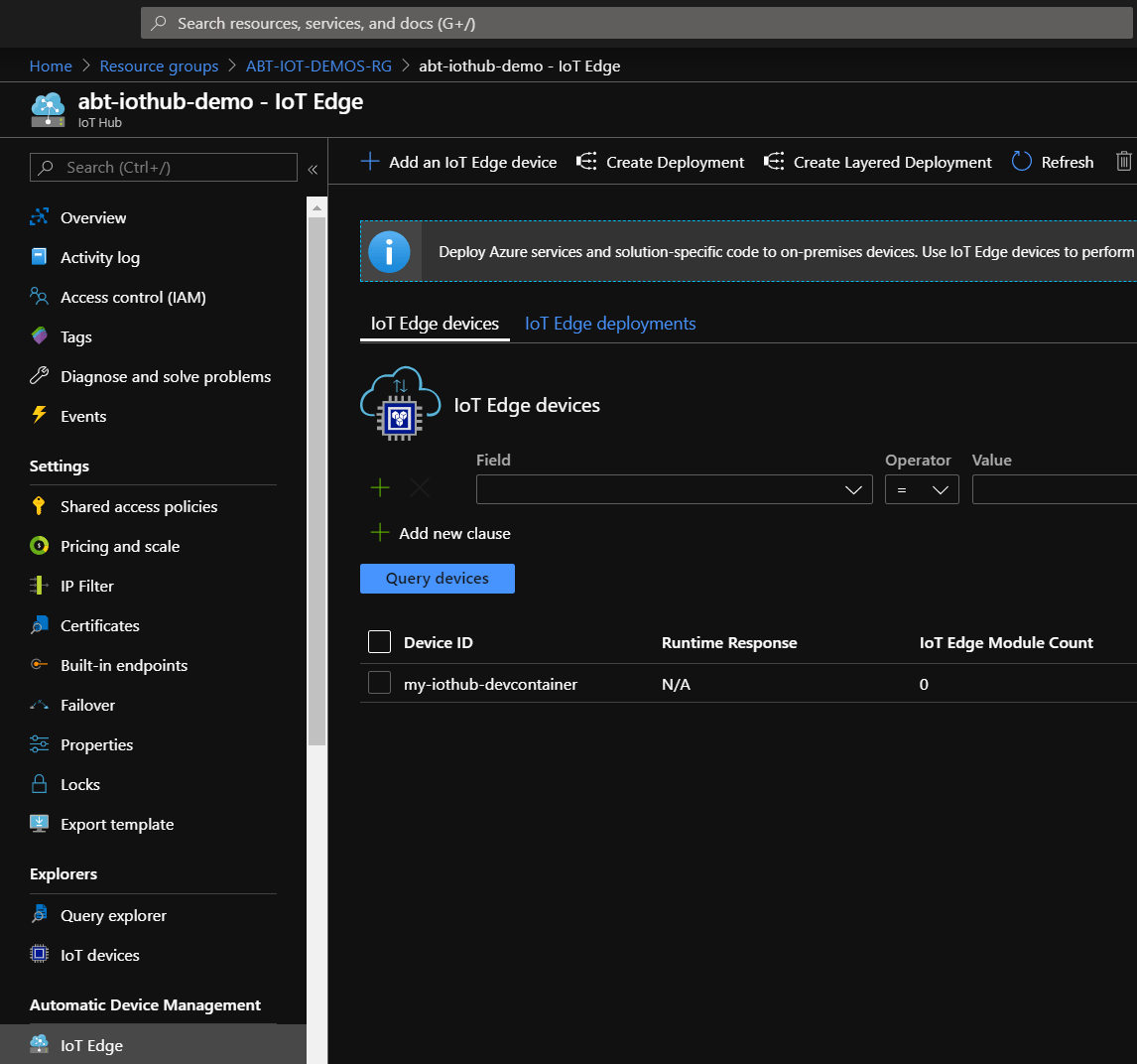
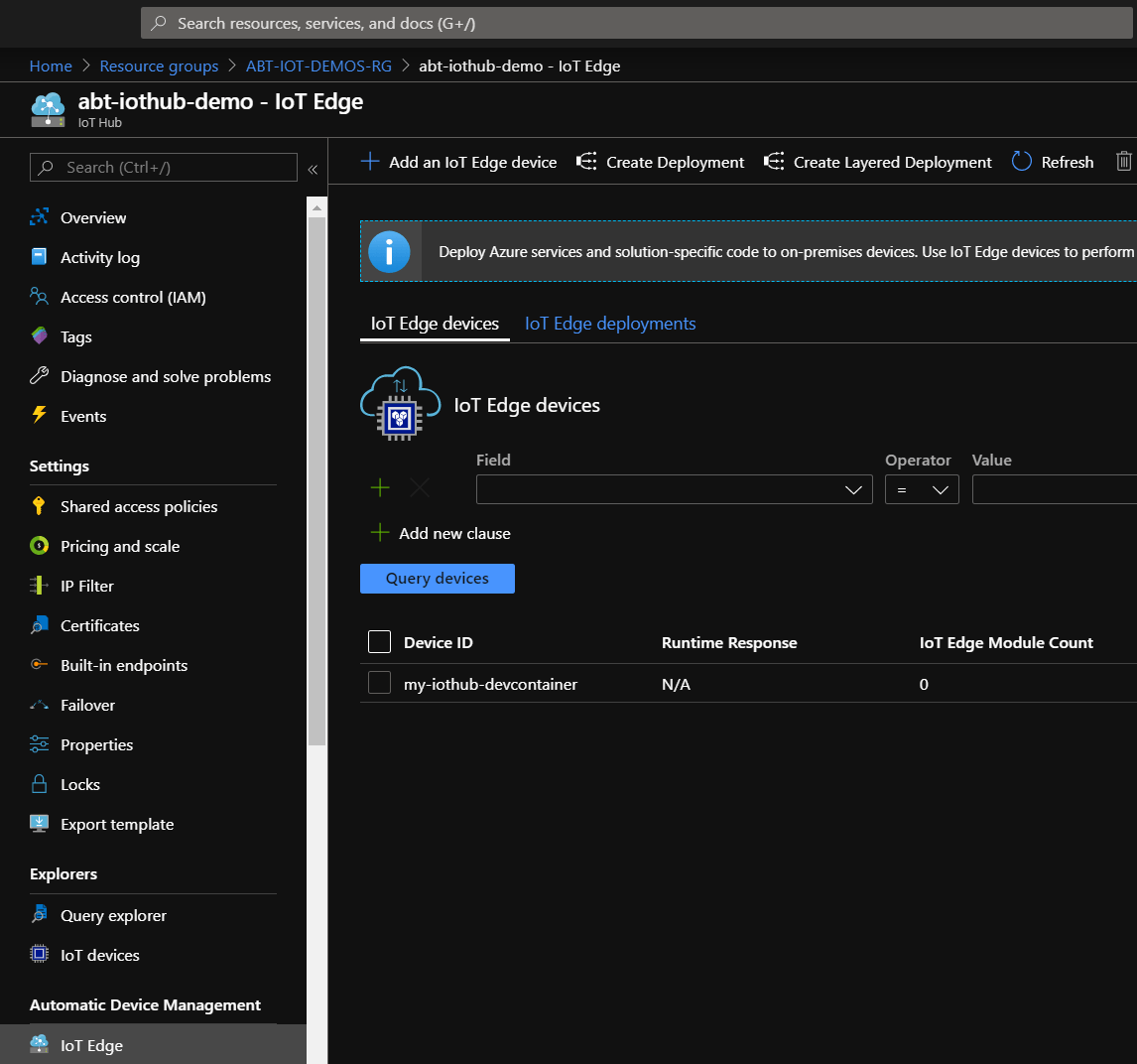
The overview of the IoT Edge in the Azure Portal also shows all settings made in the wizard:
You can find the source of the Azure IoT Edge development container here: https://aka.ms/iotedgedev
Related articles
Feb 26, 2026 · 6 min read
Run Azure Cosmos DB locally with .NET Aspire and make emulator endpoints visible in the dashboard
When building cloud-native .NET applications, two goals often matter at the same time: a fast local development loop and a clean path to …

Sep 24, 2025 · 9 min read
Automatically discover tools for Azure OpenAI Realtime API
Azure now provides a unified Realtime API for low‑latency, multimodal conversations over WebRTC or WebSockets. If you’ve used the earlier …
Sep 01, 2025 · 3 min read
Azure Document Intelligence – Fix: ContentSourceNotAccessible (Invalid data URL)
Problem Training custom models (for example, delivery notes) in Azure Document Intelligence initially worked fine. Suddenly, both training …
Author

BEN ABT
Ben is a Principal Software Engineer at Medialesson.de, with a strong focus on .NET and Microsoft Azure. In his professional role, he designs and builds highly scalable platforms for hybrid and cloud-based scenarios. He also advises companies and C-levels on migrating to the sovereign cloud.
He runs myCSharp.de, the largest and most active German-speaking C# community forum, actively contributes to both his own and external open-source projects and regularly shares his knowledge through his blog, at community events, conferences and as a writer for technical magazines.
Let's Work Together
Looking for an experienced Platform Architect or Engineer for your next project? Whether it's cloud migration, platform modernization or building new solutions from scratch - I'm here to help you succeed.
Comments